Beercap Mosaic

Transform images into beercap art instructions

Create Stunning Mosaic Art from Your Beercap Collection

Turn your physical collection into a digital masterpiece and get step-by-step instructions to build it in real life.

✅ Works Offline ⚡ WASM Powered 📦 Global Optimization
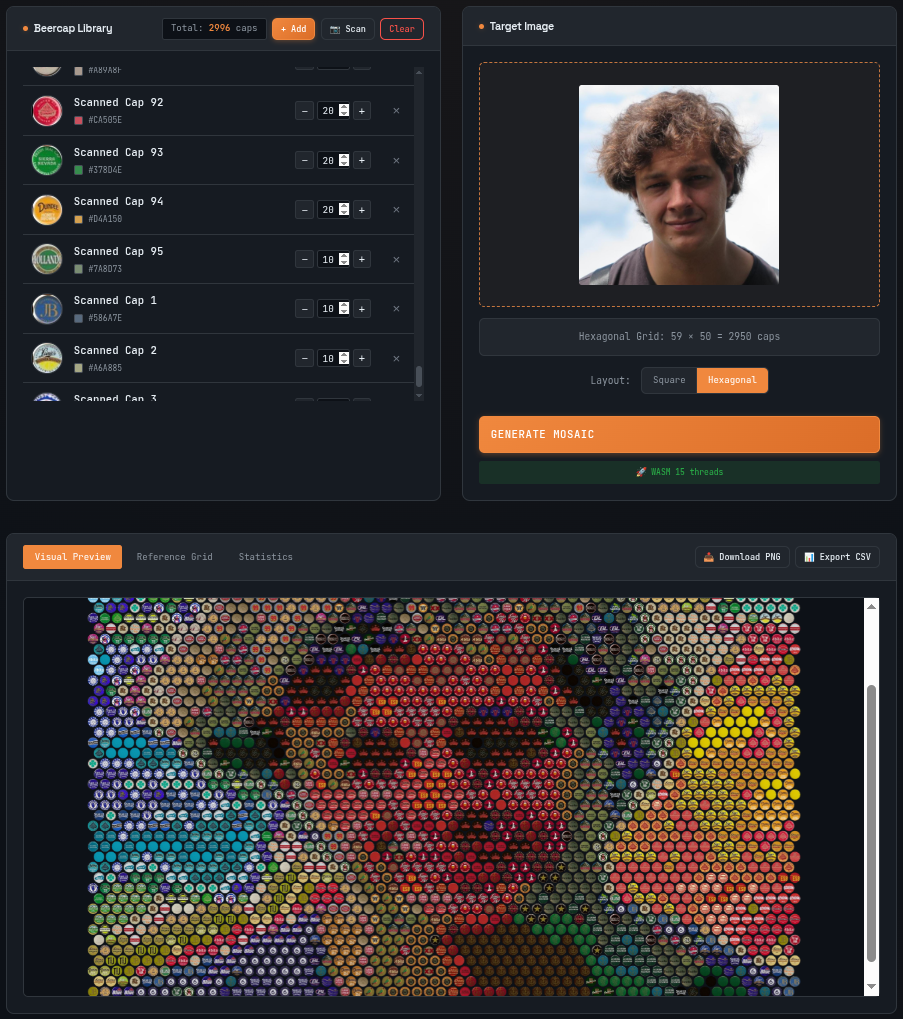
Beercap Mosaic Generator Interface

How It Works

🍺
Your Beercaps
→
🖼️
Target Image
→
🎨
Mosaic Grid

1 Build Your Beercap Library

Upload photos of each unique beercap. The app automatically extracts the dominant color using center-weighted sampling. Set the quantity you have available for each type.

📷 Smart Scanner: Photograph many caps at once; the scanner auto-detects, clusters, and counts duplicates for you.

2 Upload Target Image

Choose the image you want to recreate. The app calculates the optimal grid size based on your total available caps and the image's aspect ratio.

💡 Tip: High-contrast images with ~500 caps yield the best results!

3 Generate Optimized Mosaic

Our Hungarian Algorithm (compiled to WebAssembly) finds the globally optimal assignment of caps to grid positions.

Unlike "greedy" algorithms, global optimization ensures the best overall color match across the entire mosaic.

4 Build Your Art

Follow the reference grid with letter codes (A, B, C...) to assemble your mosaic. Export as PNG or CSV for a printable reference.

Best Practices for Great Mosaics

📸 Photo Quality

Good lighting and neutral backgrounds make color extraction more accurate.

📐 Grid Layout

Choose Hexagonal for a natural, tightly-packed honeycomb look.

🎨 Color Variety

A diverse palette of caps allows for more detailed transitions and shading.

Mosaic Generator

Beercap Library

📦 Building Your Library

Add manually: Upload individual beercap photos. Colors are auto-extracted from the center.

Scan multiple: Photograph many caps at once on a contrasting surface. The scanner auto-detects and groups duplicates.

💡 More color variety = better mosaics!

Total: 0 caps

No beercaps added yet.

Click "Add Beercap" to start building your library.

Target Image

🖼️ Choose Your Image

Upload the image you want to recreate as a beercap mosaic.

The app calculates the optimal grid size based on your available caps and the image's aspect ratio.

💡 ~500 caps creates recognizable images. High contrast images work best!

🖼️

Click or drag image here

Supports JPG, PNG, GIF, WebP

Upload an image and add beercaps to see grid dimensions
Layout:

📐 Grid Layouts

Square: Traditional grid pattern, easier to build.

Hexagonal: Offset rows create a more natural, tightly-packed honeycomb look.

🧠 The Algorithm

Uses the Hungarian Algorithm for global optimization — not just picking the best cap for each spot, but finding the best overall arrangement.

This means a cell might get a slightly worse match so that another cell can get a much better one, improving total quality.

⚡ Performance Status

The indicator below shows your active computation engine:

  • 🎮 GPU Accelerated — Blazing Fast! Massively parallel WebGPU compute shaders on your GPU.
  • 🚀 WASM X threads — Fast. Multi-threaded WebAssembly using all your CPU cores.
  • ⚡ WASM (single-threaded) — WebAssembly single-threaded CPU.
  • 🐢 JavaScript Fallback — Slowest. Pure CPU JavaScript fallback.
⏳ Detecting acceleration...